Add us to your GoDaddy account.
Invite Wondaur as a delegate on GoDaddy, so we can work on your domain and products for you. You never share your password, and we can’t see your payment details. It takes about two minutes.
Before you start
- Use a computer. The steps are easiest to follow on a bigger screen.
- Sign in with the GoDaddy account that holds your domain. If you have more than one login, use the one that shows your domain under My Products.
- The email to invite is hi@wondaur.com.
Open Delegate Access
On a computer, go to your GoDaddy Delegate Access page and sign in if it asks. Look for the section called People who can access my account.
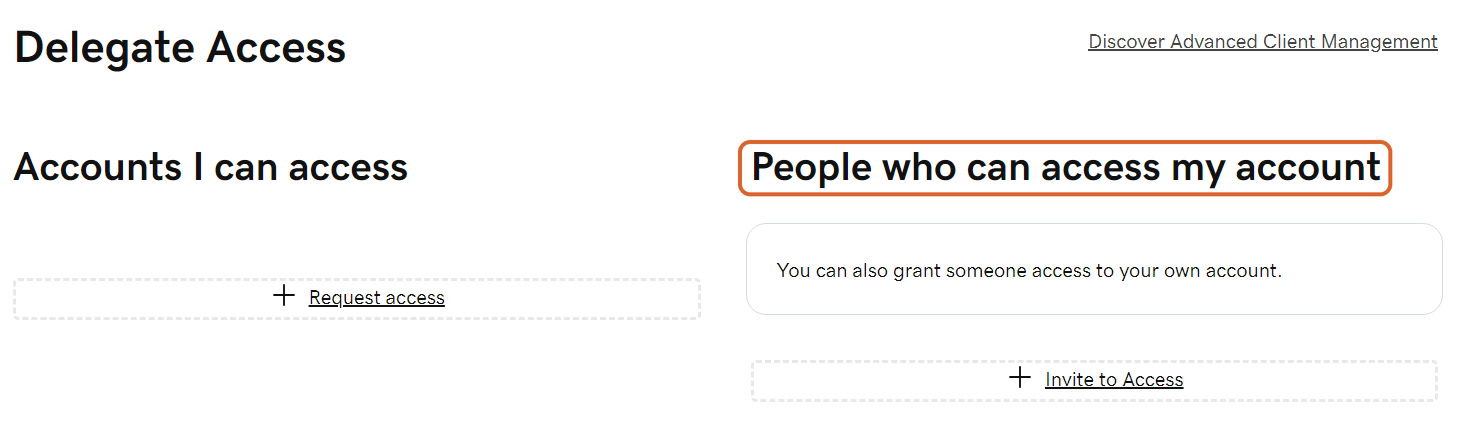
Select Invite to Access
Under People who can access my account, select Invite to Access.
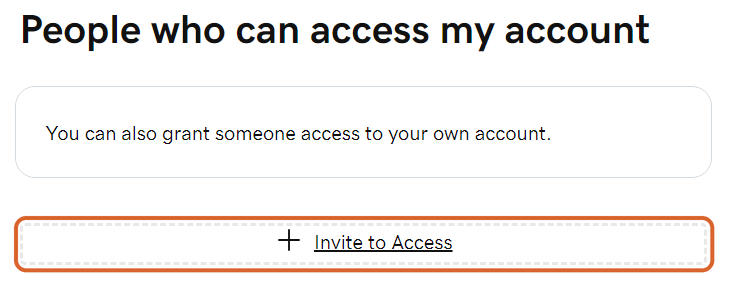
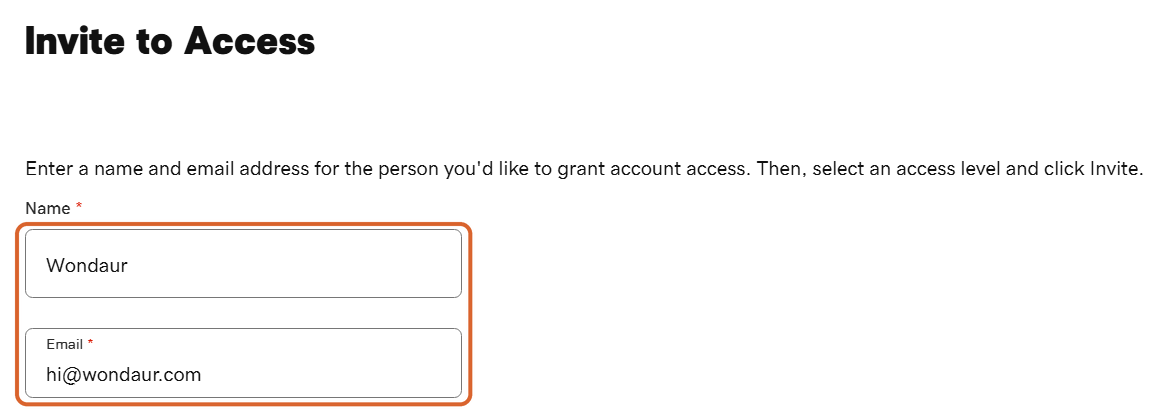
Type our name and email
In Name, type Wondaur. In Email, type hi@wondaur.com.
Choose Products & Domains
Under Access level requested, choose Products & Domains. We don’t need the first option, which lets someone buy things with the cards saved on your account.

Select Invite
At the bottom of the box, select Invite. GoDaddy emails us your invitation.

That’s it. What happens next
GoDaddy emails us the invitation and we accept it, usually within one business day. GoDaddy then lets you know we’ve accepted.
As a delegate we can open your GoDaddy products and manage your domains, such as nameservers, hostnames and forwarding. We can’t see or change your password or payment methods, and at this access level we can’t buy anything on your account. Transferring or deleting a domain falls under a separate Transfer Access permission, which we don’t need for this.
You stay in charge. You can change our access level or remove us at any time.
If something doesn’t match
- GoDaddy asks you to verify it’s you. That’s normal for this page. Approve the request in the GoDaddy app or follow the steps on the screen, and the page will open.
- You typed something wrong. Cancel the pending invitation on the Delegate Access page, then invite us again.
- The invitation ran out. GoDaddy invitations expire if they aren’t accepted within 48 to 72 hours. Send a new one and let us know.
- GoDaddy’s screens look a little different. GoDaddy changes its screens from time to time. The words stay the same: Delegate Access, Invite to Access, Products & Domains, Invite.
Stuck on a step? Email hi@wondaur.com or send us a message from your dashboard, and we’ll walk you through it.

Stuck on a step? Ask us.
A real person reads every message and writes back.